Checks and approvals
Every post is checked
Section titled “Every post is checked”Nothing is published, whether you write it, generate it, schedule it or an automation creates it, without a content check. The check looks for things such as hateful or offensive content, scams, personal data and risky claims, plus any industry rules you have turned on. A post that fails cannot be published.
Results are:
- Clear: ready to go.
- Review: needs a person to read it and decide.
- Blocked: cannot be published. Edit the text and check again.
Approvals
Section titled “Approvals”- Working alone. You can approve your own posts. For posts that were held for review, you confirm a short statement that you have read it. This is recorded.
- With a team. Workspaces with two or more people need a different Owner or Reviewer to approve held posts. Roles are Member, Reviewer and Owner, managed in Settings > Team.
- An approval is tied to the exact text, image, link and destination. If any of these change afterwards, the approval is cleared and the post needs approving again.
Review & Compliance
Section titled “Review & Compliance”The review queue lists posts the compliance check flagged for a decision. A post waiting here cannot be scheduled or published; this is enforced by the system, not just on the screen. The archive keeps a tamper-evident record of decisions that owners can export.
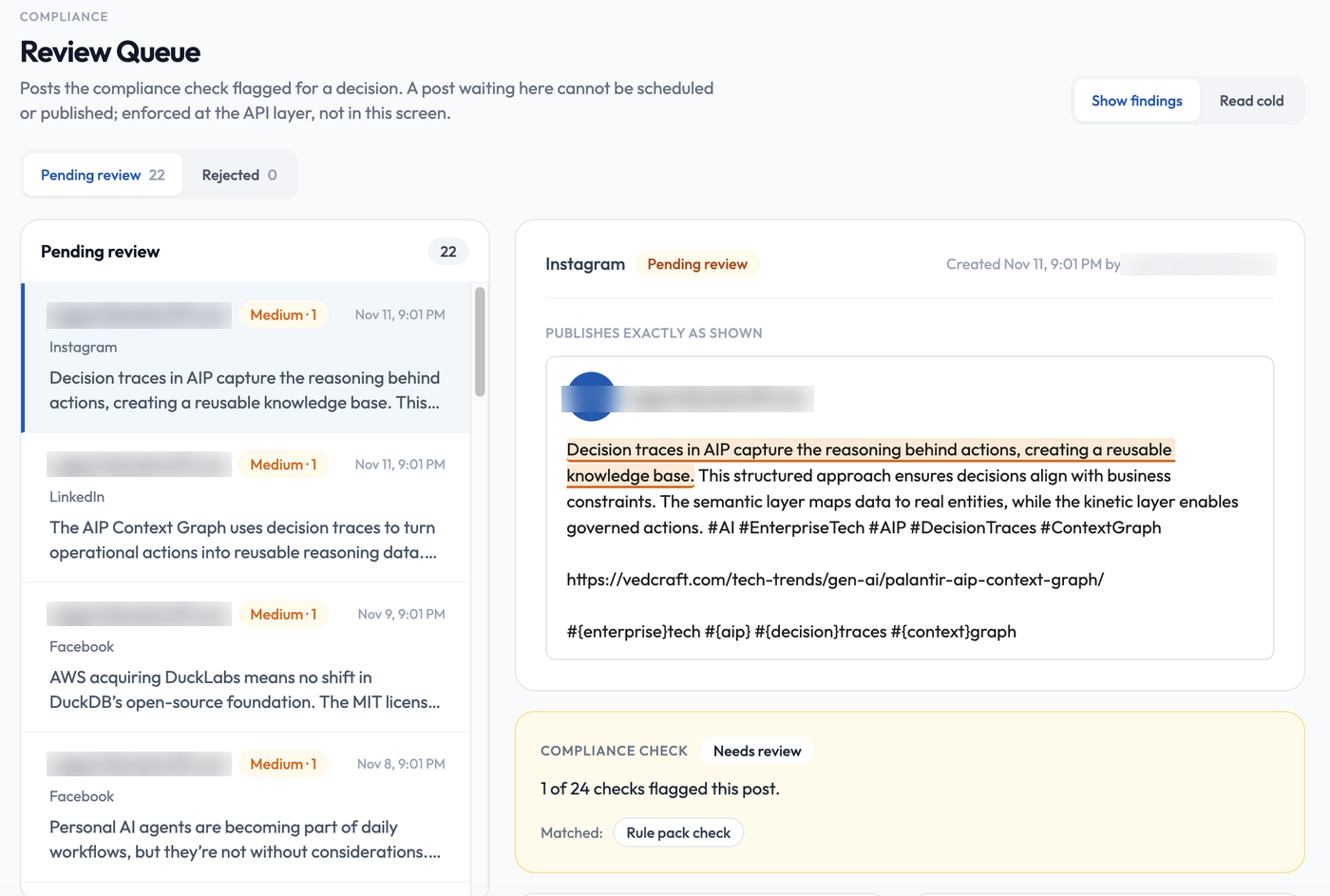
- Use the Pending review and Rejected tabs to switch lists. Each row shows who created the post, the platform, a severity badge and when it was created.
- Select a post to see it as it will publish (“Publishes exactly as shown”), with the flagged text highlighted.
- The Compliance check panel says how many checks flagged the post (for example “1 of 24”) and which ones matched.
- Show findings and Read cold switch between the flagged view and a clean read of the post.
AI-generated content
Section titled “AI-generated content”- AI images carry a small visible “AI-GENERATED” mark and hidden metadata. Do not crop it out.
- Posts with an AI image can include an “Image created with AI.” caption line. You can opt out of the caption.
- Turning on an automation asks you to accept responsibility for AI-generated content.
Copyright notices
Section titled “Copyright notices”Anyone can report a copyright concern at vedxai.com/dmca. Reported posts can be taken down by VedXAI.